
Product · Sheet Set EditorAvailable

Sheet Set Editor — the lightweight Sheet Set Manager alternative for AutoCAD

Open, batch-edit and save AutoCAD DST sheet sets — without the SSM dialog maze.

Edit fast, fill smart and save safely. Perfect for small, quick-to-edit sheet sets — built for smaller firms that don't want to pay top-tier prices but still want easy, powerful features. For large, complex projects, other alternatives exist.

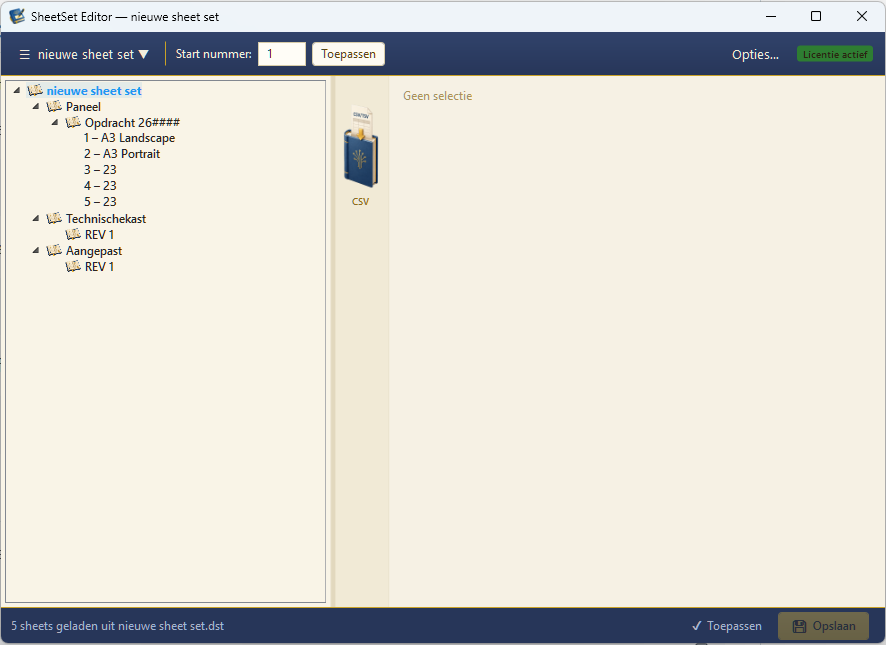
Sheet Set Editor — hoofdvenster met boomstructuur, subsets en sheets.
The problem

Sheet Set Manager costs too much time

Too many dialogs

Every property takes several clicks through separate AutoCAD dialogs.

Messy metadata

Revisions and dates spread across sheets and are hard to align.

Little overview

Large sheet sets need tree structures the default interface doesn't offer.

Key features

Everything within reach

Fast property editing

All sheet properties editable directly, no dialogs.

Smart fields

Autofill from project or CSV data.

Visual groups

Group sheets logically, even at 100+ drawings.

Revisions

Overview per sheet with clear history.

Project structure

Subsets in a calm tree view.

Safe workflow

Backup and validation before every save.

AutoCAD 2027

Aligned with the latest Sheet Set formats.

Windows desktop

Native WPF app, no cloud required.

Example workflow

From CSV to finished sheet set in four steps

  1. Step 01
    Open DST

    Pick your existing sheet set or create a new one.

  2. Step 02
    Import CSV

    Fill properties in one go from your project list.

  3. Step 03
    Review

    Sheets, revisions and smart fields at a glance.

  4. Step 04
    Save safely

    Backup before write, DST structure intact.

Interface

Designed for the daily drafter or engineer

Sheet Set Editor — hoofdvenster met boomstructuur, subsets en sheets.
Safety

We handle your project files with care

Sheet sets are the backbone of a drafting project. We treat DST and DWG files accordingly.

Non-destructive

Changes are only written to the DST file on explicit command.

Automatic backup

Before every save the editor backs up your original DST file.

Easy recovery

Rolling back to the previous version is in the menu, not a complex recovery.

Preserves structure

Subsets, references and custom properties remain as they were.

Pre-flight validation

Required fields and errors are reported before saving.

Local, no cloud

Your files never leave your workstation or network share.

Comparison

Sheet Set Manager vs Sheet Set Editor

Sheet Set Manager (SSM) ships with AutoCAD and does its job. Sheet Set Editor is built for the moments where SSM slows you down.

FeatureSheet Set ManagerSheet Set Editor
Editing sheet propertiesOne dialog per propertyInline, directly in the list
Filling many sheets at onceManual, sheet by sheetCSV import in one pass
Overview of large setsPalette with limited depthTree view with your own groups
Backup before savingNot built inAutomatic, on every save
Validation before savingNot built inRequired fields checked up front
Runs without AutoCAD openNo, part of AutoCADYes, standalone Windows app
LicenceIncluded with AutoCADOne-off licence per user
Background

Editing AutoCAD sheet sets: where the time goes

Anyone working with AutoCAD sheet sets every day knows the pattern: a drawing list that keeps growing, sheet numbers that need renumbering, revision dates typed in one sheet at a time, and a Sheet Set Manager that opens a dialog for every change. Sheet Set Editor is built around exactly that bottleneck — bulk editing .dst sheet sets, outside AutoCAD.

What a .dst file actually contains

A sheet set (.dst) is not a drawing, it is an index. It holds the order of sheets, references to the layouts inside your .dwg files, the subset structure and every custom property your title block reads. Because it is an index, editing it separately is safe: the geometry in your drawings is untouched. Sheet Set Editor loads that index, lets you edit everything in a single table and writes the structure back unchanged.

Batch editing instead of sheet by sheet

At twenty sheets manual editing is annoying; at two hundred it is unworkable. With CSV import you fill sheet numbers, titles, drafter initials, scale and revision fields in one pass. The same route works in reverse: export the sheet list to CSV for project administration, work preparation or external planning. Your drawing list and your sheet set stay in step automatically.

Revision control that stays auditable

Revision numbers and dates are the first thing to drift once several drafters touch a set. Sheet Set Editor shows all revision fields in one column, so outliers stand out immediately. Required fields are validated before saving and a backup of the original .dst is written automatically — you can always return to the previous state without a recovery procedure.

When to stay in Sheet Set Manager

Sheet Set Editor does not replace SSM and does not pretend to. Publishing, plotting, sheet thumbnails and creating new layouts remain AutoCAD tasks. The editor targets the data side: numbering, renaming, filling properties, updating revisions and cleaning up the set. Many users keep both open and pick whichever tool is fastest for the task in front of them.

People also search for
  • Sheet Set Manager alternative
  • edit AutoCAD sheet set
  • open DST file
  • bulk edit sheet set properties
  • AutoCAD drawing list CSV export
  • SSM alternative for Windows
  • sheet set editor without AutoCAD
More questions

Practical questions from daily use

Can I renumber sheets in bulk?

Yes. Edit sheet numbers inline in the list or import a complete numbering scheme from CSV. Nothing is written to the .dst file until you save.

Can I export the sheet list to Excel?

You can export the sheet list to CSV, which opens directly in Excel or Google Sheets — useful for drawing registers, handover files and progress reports.

Do custom properties from our title block keep working?

Yes. Custom properties at sheet and sheet set level are preserved and editable, so the fields your title block reads stay linked.

Can several people work in the same sheet set at once?

A .dst is a single file on a network share, so simultaneous writing is discouraged — exactly as with Sheet Set Manager. The editor warns you when the file is locked by another process.

Do I need an AutoCAD licence to run the editor?

No. Sheet Set Editor is a standalone Windows application. You still need AutoCAD to plot and publish the sheets themselves.

What does Sheet Set Editor cost?

A one-off licence per user, no subscription. Get in touch for the current price and trial access.

FAQ

Questions about sheet sets and SSM

Is there an alternative to AutoCAD's Sheet Set Manager?

Yes. Sheet Set Editor is a standalone Windows app that opens the same .dst sheet set files and lets you edit sheets, properties and revisions without going through the SSM palette.

What is a DST file?

A .dst file is AutoCAD's sheet set file. It stores the list of sheets, their layout references, subsets and custom properties — the drawings themselves stay in your .dwg files.

Can I edit a sheet set without opening AutoCAD?

Yes. Sheet Set Editor reads and writes the .dst file directly, so you can prepare sheet numbers, titles and revisions while AutoCAD is closed.

Does Sheet Set Editor replace Sheet Set Manager?

It does not remove SSM — both work on the same .dst file. Use SSM for publishing and plotting inside AutoCAD, and Sheet Set Editor when you need to edit a lot of sheet data quickly.

Is it safe to edit a .dst outside AutoCAD?

Sheet Set Editor is non-destructive: nothing is written until you save, every save is preceded by an automatic backup of the original .dst, and subsets, references and custom properties are preserved.

Which AutoCAD version is supported?

The editor targets the AutoCAD 2027 sheet set format and runs on Windows 10 and 11.

Ready to try?

The trial gives you 10 saves or 14 days — whichever comes first. Get in touch for access.