
Sheet Set Editor for AutoCAD
A lightweight alternative to Sheet Set Manager.
Edit fast, fill smart and save safely. Perfect for small, quick-to-edit sheet sets — built for smaller firms that don't want to pay top-tier prices but still want easy, powerful features. For large, complex projects, other alternatives exist.
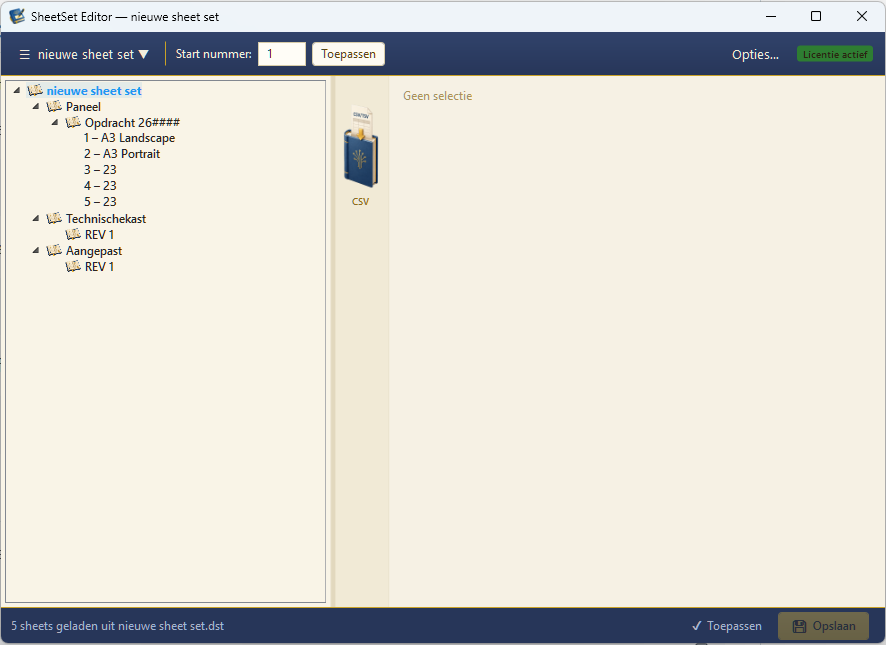
Sheet Set Manager costs too much time
Every property takes several clicks through separate AutoCAD dialogs.
Revisions and dates spread across sheets and are hard to align.
Large sheet sets need tree structures the default interface doesn't offer.
Everything within reach
All sheet properties editable directly, no dialogs.
Autofill from project or CSV data.
Group sheets logically, even at 100+ drawings.
Overview per sheet with clear history.
Subsets in a calm tree view.
Backup and validation before every save.
Aligned with the latest Sheet Set formats.
Native WPF app, no cloud required.
From CSV to finished sheet set in four steps
- Step 01Open DST
Pick your existing sheet set or create a new one.
- Step 02Import CSV
Fill properties in one go from your project list.
- Step 03Review
Sheets, revisions and smart fields at a glance.
- Step 04Save safely
Backup before write, DST structure intact.
Designed for the daily drafter or engineer
We handle your project files with care
Sheet sets are the backbone of a drafting project. We treat DST and DWG files accordingly.
Changes are only written to the DST file on explicit command.
Before every save the editor backs up your original DST file.
Rolling back to the previous version is in the menu, not a complex recovery.
Subsets, references and custom properties remain as they were.
Required fields and errors are reported before saving.
Your files never leave your workstation or network share.
Ready to try?
The trial gives you 10 saves or 14 days — whichever comes first. Get in touch for access.